AI-style draft
In today’s rapidly evolving digital landscape, it is important to note that businesses must leverage innovative solutions in order to enhance productivity and achieve success.



In today’s rapidly evolving digital landscape, it is important to note that businesses must leverage innovative solutions in order to enhance productivity and achieve success.
Digital tools change quickly. Businesses that choose the right ones can save time, work more efficiently, and get better results.
This example shows the type of revision to look for. Always review the final text for meaning, facts, tone, and your own voice.
Paste AI-generated text and quickly turn stiff, generic sentences into clearer, smoother, more human wording.
Humanize AI writing by making it sound more conversational, more polished, and better matched to your audience and context.
Replace repeated phrases, bland wording, and predictable patterns that make AI text feel generic or obviously machine-written.
Once your draft sounds natural, copy it into essays, emails, blog posts, product pages, social posts, and other everyday content.
AI-generated drafts can save time, but they often sound stiff, generic, or overly uniform. Linguix helps transform that text into something clearer and more natural by improving phrasing, sentence rhythm, and word choice.
This is useful for students, marketers, support teams, freelancers, founders, and anyone who wants faster drafting without publishing text that sounds robotic. You can humanize long paragraphs or just refine a few awkward lines before you hit send or publish.
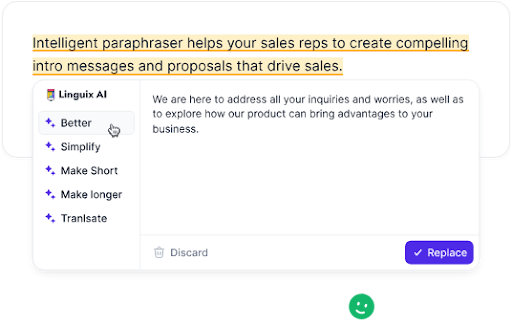

Linguix works across websites, documents, email platforms, and business tools, helping you humanize AI writing inside the workflow you already use. Instead of pasting text across multiple tools, you can improve naturalness and readability where your draft already lives.
That makes the tool practical for editing website copy, outreach emails, product descriptions, social posts, reports, and other writing that needs to sound trustworthy and human. It is especially useful when AI gives you a strong first draft but the final wording still needs polish.
With faster rewriting and better style suggestions, you can keep moving without getting stuck editing every sentence manually.
Human-sounding writing is not only about avoiding robotic phrases. It also means choosing the right tone for the person reading your text. A good AI humanizer helps make writing more warm, direct, concise, or professional depending on context.
That is valuable when you are adapting AI drafts for customers, coworkers, readers, students, or business partners and want the message to feel more authentic and easier to trust.
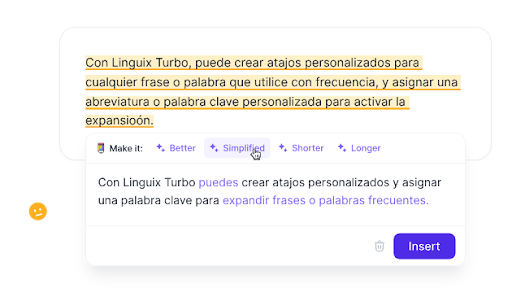

AI can help you draft faster, but strong final copy still needs human-sounding phrasing, better transitions, and more purposeful wording. Linguix helps bridge that gap so your content feels more polished and ready to share.
Use it to improve blog posts, landing pages, essays, emails, and internal documents when you want speed from AI without the downside of generic, mechanical language.
After humanizing, review the result in your own voice and run it through the Linguix AI Content Detector. Detection scores are estimates, so verify meaning, facts, and any disclosure requirements before publishing or submitting your text.
An AI humanizer rewrites text that sounds robotic, repetitive, or overly generic and makes it feel more natural, fluent, and human. It helps improve tone, rhythm, clarity, and word choice while preserving the original meaning.
Linguix rewrites awkward phrasing, improves sentence flow, and adjusts wording so AI-generated text sounds more natural and readable. It helps make drafts feel less mechanical and more aligned with how people actually write.
Yes. You can humanize essays, emails, articles, reports, website copy, product descriptions, and other types of content where natural tone and readability matter.
That is the goal. Linguix helps preserve the main idea of your text while improving style, flow, and natural phrasing. You should still review the final version to make sure it matches your intent.
No. Linguix can also improve human-written drafts by fixing grammar, spelling, punctuation, clarity, and style across websites and apps.