


Approximately 15% of people suffer from dyslexia. The symptoms vary from person to person and usually depend on how severe the condition is. The primary challenges, however, include issues with word recognition, reading, spelling, grammar and writing.
This disorder not only lowers self-esteem but also affects school and work performance. For instance, an email with grammar mistakes can scare off 25% of potential leads.
AI-based writing assistant Linguix can make the impact of the disability less damaging. To better understand what struggles dyslexics face and how Linguix helps these users, we have conducted a survey. Here’s what we have found.
Methodology
To compile the report, we studied data from 3543 dyslexic subscribers of our email newsletter. We asked a number of questions regarding psychological and work-related issues these users experience while communicating online or performing writing tasks.
Finally, our team analyzed how dyslexic users benefit from Linguix tools and what particular features they enjoy the most.
Key Takeaways
Types of online communications
First, the dyslexic respondents were asked what issues they have when communicating online: 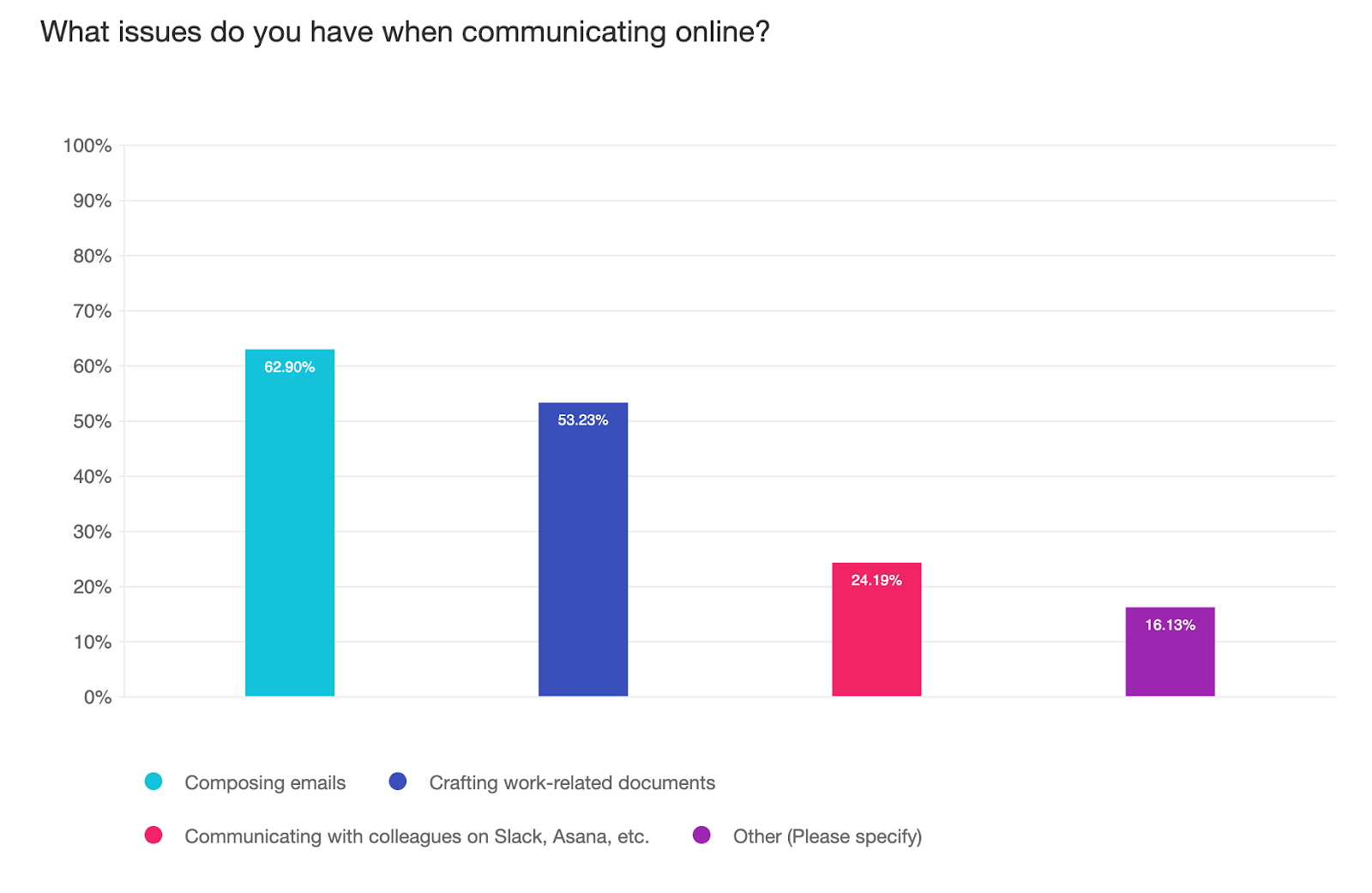
It turned out that dyslexics struggle a lot when writing emails. Due to the condition, people with dyslexia may confuse letters that look similar or put them the wrong way around.
As a result, many emails are sent with typos and incorrect spelling. No prizes for guessing what dyslexics feel when this happens: anxiety and shame to name a few. Respondents confirmed that they feel worried about sending a business letter with a typo:
❝ Yes, I’m far from illiterate but I get busy and I make errors when I rush over a task.❞
❝Yes in a previous job I was posting for veterans or memorial day and I typed ‘soilder’ instead of soldier I did not notice. My boss called me upset because he had people messaging him about the error. I was mortified.❞
❝ Yes, I’m worried I’ll come off less professional because my grammar or spelling is improper.❞
The importance of grammar
We also found out whether respondents believe that grammar is important in their communications with colleagues. 86.7% of them think that it’s the first indicator of your intelligence and professionalism:
❝ I don’t know about other colleagues’ opinions, but I know it feels a lot less professional when grammar is incorrect. I tend to rely on my checkers to catch stupid errors and sound professional, even when I’m being personal.❞
❝ Very important. People view grammar as a direct indication of where you are intellectually. No one wants a representative of a company who looks uneducated.❞
❝ I personally find grammar to be extremely important, especially since the majority of the time the tone of voice isn’t obvious. The period when I use proper grammar helps me to deliver the proper tone with my message.❞
How dyslexia symptoms may affect career
On top of that, we asked if they made noticeable mistakes due to their disorder and how it affected their career. For example, our PR director once typed “butt” instead of “but” in business correspondence. Luckily, her addressee had a great sense of humor and this inoffensive typo just made him laugh. Dyslexic users are no exception, 92.3% are worried about their career:
❝YES! I had a few times before Linguix that I made some pretty bad mistakes. Once, I talked about a ‘pubic’ facing API. Another time, I misspelled a senior VP’s name (Ash -> Ass). I got an email from IT immediately about the ‘bad word’ filter, as well as the embarrassment about the VP’s name. After that, I started to take extra time to reread all my emails out loud or use text to speech. With something like Linguix, I have a slightly better chance of catching it quickly.❞
❝Yes! Absolutely I worry about that often.❞
How Linguix Helps Dyslexic Users
In the end, our team analyzed what Linguix tools dyslexic users find the most helpful.
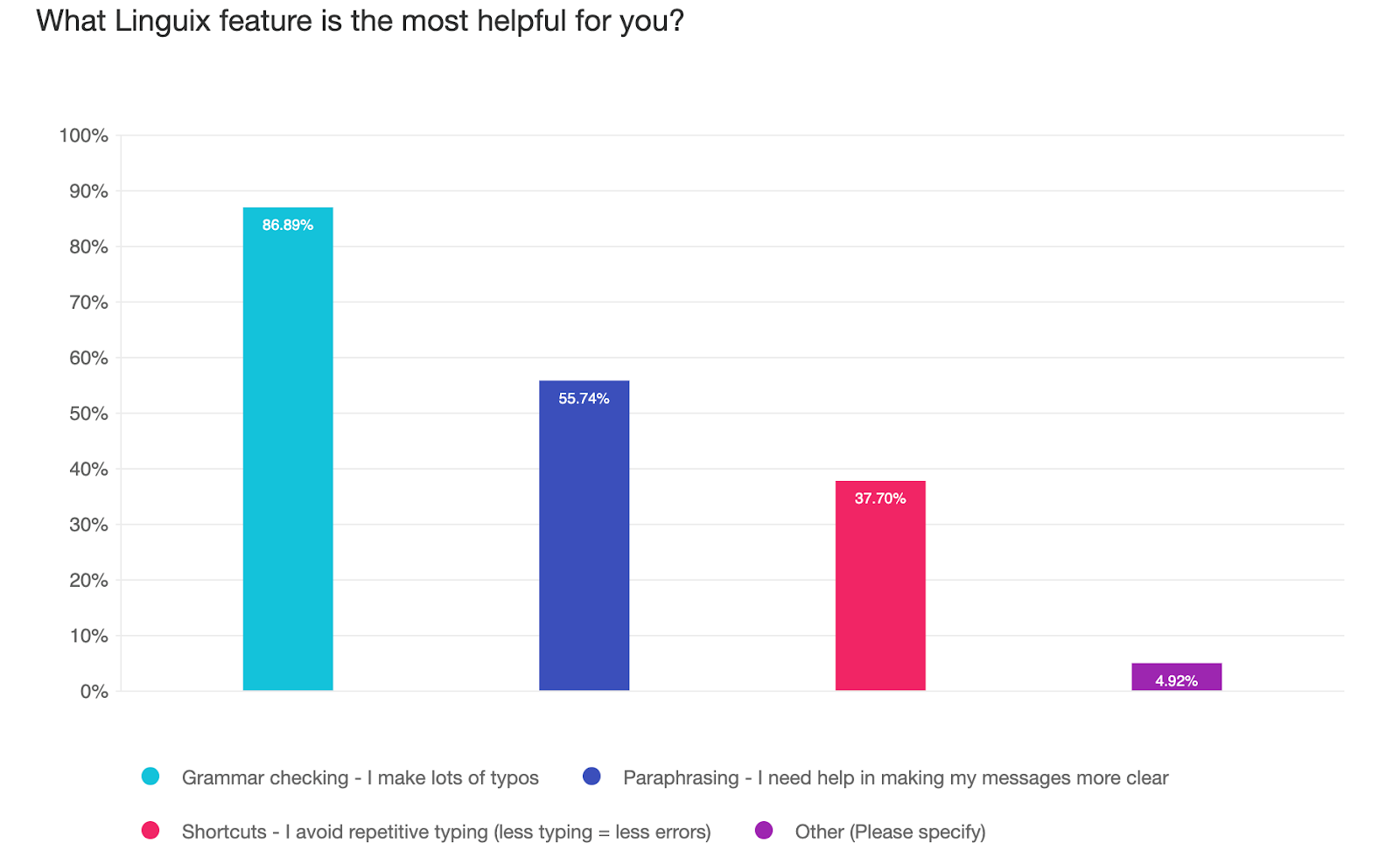
As previously mentioned, dyslexics make lots of typos due to their condition, therefore it’s apparent that the grammar checker is the most valuable feature for them (almost 90% of answers!).
Nevertheless, Paraphraser and Shortcuts are used a lot as well – 55% and 37% of dyslexics respectively believe they’re helpful. Less typing – fewer typos!
Besides, thousands of businesses worldwide use Linguix Style Guides – a set of standards for the writing, formatting, and design of documents. This feature ensures that employees use correct brand and product names.
Free Premium for Dyslexic Users
Our survey has proven that AI writing assistants became a necessity for dyslexic users.
After a thorough analysis of their needs, our team decided to provide all dyslexic users with Linguix Premium free of charge for 3 months. To get your Premium plan, click the link and enjoy your error-free copies, messages and emails.
Hope you find it helpful!
Practical strategies to reduce writing stress
Combine assistive tools with a few simple habits to catch more errors and feel more confident before you hit send. Small routines-like using text-to-speech, templates for common messages, and focused proofreading steps-can significantly reduce typos, awkward phrasing, and anxiety.
- Run a grammar/spell check as a first pass, then read the message aloud or use text-to-speech to catch homophones and missing words.
- Create reusable templates and shortcuts for recurring emails, job titles, product names, and signatures to avoid manual typing errors.
- Break proofreading into stages: content and tone first, then spelling and names, then formatting and attachments.
- For high-stakes messages, pause 10-15 minutes before sending or ask a trusted colleague to glance over the draft.
- Keep a short checklist for urgent communications: correct names, correct numbers/dates, polite tone, and attachments included.
Practicing these habits alongside your chosen writing tools will help reduce mistakes, save time, and improve how your messages are received.
FAQ
Will automated suggestions change my personal voice?
No-most tools offer suggested edits that you can accept, adjust, or reject. Use suggestions to fix clarity and correctness while keeping wording you prefer; paraphrasing features can help you find alternative phrasing without losing your tone.
How can I avoid embarrassing name or brand misspellings?
Save frequently used names and terms as snippets or entries in a personal style list so they auto-populate correctly. Also double-check proper nouns manually, since automated checkers can miss context-specific errors.
What’s a quick routine for proofreading under time pressure?
Use a short checklist: (1) run a spell/grammar pass, (2) listen with text-to-speech, (3) verify names/numbers, (4) scan for tone. If possible, delay sending by a few minutes to allow a final glance.


